React Multiple Select – Metronic Theme and React Hooks

This article introduces the React Multiple Select using React Hooks.

I have vendors in various cities who are providing service to their customers. The situation is I need to assign societies to vendors as per their preference. A vendor may provide service to multiple societies in an area.

For this, I used Metronic theme and React hooks – useEffect.

There is a list of vendors and now I want to assign societies to a particular vendor.

To do so I redirected to details of the vendor.

First, select a city, then an area and then I want a filtered list of societies from that area of the city.

 

React Multiple Select - Metronic Theme and React Hooks

Step 1 :
Fetched a list of cities using async-await with useEffect hook.

/* Get list of all Cities */

const apiUrl = API_ENDPOINT + “city_list/”;

useEffect(() => {

const fetchData = async () => {

const result = await axios(apiUrl).then(response => response.data)

.then((data) => {

setData(data.data);

let count = Object.keys(data.data).length;

setcount(count);

})

};

fetchData();

}, []);

/* End Get list of all Cities */


Step 2 :

Fetched a list of areas from the selected city using async-await with useEffect as —>

/* Get area list by City */

const apiUrlArea = API_ENDPOINT + “area_list/”;

useEffect(() => {

let postAreaData=”;

if(formdata.city_id && formdata.city_id !==”){

postAreaData = {city_id:formdata.city_id}

const fetchData = async () => {

const result = await axios.post(apiUrlArea,postAreaData).then(response => response.data)

.then((data) => {

setareadata(data.data);

})

};

fetchData();

}

},[formdata.city_id]);

/* End Get area list by City */


Here formdata contains details of the vendor to edit.


This code will get executed as we change City and we are able to get a list of all areas from the selected city.


Step 3 :

Now I have a city and area , I can get a list of all societies in that area.

/* Get Societies by City & Area */

const apiUrlGetSociety = API_ENDPOINT + “society_list”;

useEffect(() => {

let postCityAreaData = {

area_id:formdata.area_id,

city_id:formdata.city_id,

}

const temp_slist = [];

if(formdata.area_id && formdata.area_id!== ” && formdata.city_id && formdata.city_id!== ” ){

const fetchData = async () => {

const result = await axios.post(apiUrlGetSociety,postCityAreaData).then(response => response.data)

.then((data) => {

data.data.forEach(element => {

const obj_temp = {‘id’:element.id, ‘name’:element.name};

temp_slist.push(obj_temp);

});


setAllSocieties(temp_slist);

setShowLoading(false);

console.log(“allSocieties”);

console.log(temp_slist);


})

};

fetchData();


}

},[formdata.area_id,formdata.city_id]);

/* End Get Societies of Area */


Here I get a list of societies as an array of object – {id,name}


let  allSocieties = [ {“id”: 6,”name”: “Abhiruchi”}, {“id”: 2,”name”: “Sahara Society”}, {“id”: 3,”name”: “Satyam Society”},]

Now we have a filtered list of societies with respect to the area from the city.

Step 4 :

To show listing on form I used form-components from Metronics.

( https://keenthemes.com/metronic/preview/react/demo2/google-material/inputs/selects )


The Select component can handle multiple selections. It’s enabled with multiple property.

<FormControl className='form-control'>

<Select

multiple

name = “societies”

id = “societies”

value = { selectedSocieties }

onChange = { handleChange_multiple }

input = { <Input id=”select-multiple-chip” /> }

renderValue = { selected => (

<div className = {classes.chips}>

{ selected.map( s => {

const chipname = allSocieties.find(soc => soc.id === s);

return (chipname

?   <Chip

key={s}

label={chipname.name}

className={classes.chip}

data-aaa={JSON.stringify(allSocieties)}

/>

: ”)

})}

</div>

)}

MenuProps={MenuProps}

>

{ allSocieties.map((itemsociety) => (

<MenuItem

key={itemsociety.id}

value={itemsociety}

>

<Checkbox checked={selectedSocieties.includes(itemsociety.id) } />

<ListItemText primary={itemsociety.name} />

</MenuItem>

))}

</Select>

</FormControl>


In the above select component, we have passed selectedSocieties to value attribute.
selectedSocieties is an array of ids of societies which are already assigned to vendor.
I can get list of assigned societies to vendor as –>


useEffect(() => {

setShowLoading(true)

setformdata(props.data)

if(props.data.vendorSociety && props.data.vendorSociety !== ” && props.data.vendorSociety !== ‘undefined’ ){

props.data.vendorSociety.forEach(el => {

const obj = {‘id’:el.id, ‘name’:el.name};

temp_selected_slist.push(el.id);

})

setSelectedSocieties(temp_selected_slist);


}

}, [props.data]);
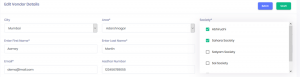
react multiple selection

After selecting one/more societies, handleChange_multiple event bind selected societies data to selectedSocieties . See the following code:


const handleChange_multiple = event =>{


let newitems = event.target.value.filter(t => typeof t !== ‘number’);

let changed = newitems[0].id;

let cleanthis = event.target.value.filter(t => typeof t === ‘number’);

newitems.forEach(i => cleanthis.push(i.id));

const newSelectedItems = selectedSocieties.includes(changed)

? selectedSocieties.filter(v => v !== changed)

: […selectedSocieties, changed];

setSelectedSocieties(newSelectedItems);


}


In the example given in Metronic , handleChange event deals with an array of the name only. In above we are dealing with an array of objects.
In the above code, in handleChange_multiple event, we get newly selected items as an object – newitems {id,name}. Then extract id from it and saved to changed. 

Now I can check with changed whether it exist in  selectedSocieties.


const newSelectedItems = selectedSocieties.includes(changed)

? selectedSocieties.filter(v => v !== changed)

: […selectedSocieties, changed];

setSelectedSocieties(newSelectedItems);


In above article , we learned how to use multiple select in combination with array of objects and obtain required results.




React JS Environment Setup and Component Creation

This article introduces the environment setup and how to create React component.

Overview of React JS

React is a JavaScript library for building interactive User Interfaces (UI’s) & it’s developed by Facebook in 2011. It follows the component-based approach which helps in building complex and reusable UI components.

Environment Setup
Tools required for ReactJS environment
1. Node.js
2. Visual Studio Code(Editor) / you can use any editor

Steps to Setup ReactJS Environment

To run the React application, NodeJS should be installed on our PC.
Then follow the below steps:

Step 1: Install NodeJS. You need to visit the official download link of NodeJS to download and install the latest version. Once we have set up NodeJS on our PC, the next thing we need to do is to set up React Boilerplate.

Step 2: Create a directory for React.js App:
using command –
mkdir ReactWorkspace

picture1

Step 3: Go to newly created ReactWorkspace directory location using command – see screenshot:

cd ReactWorkspace
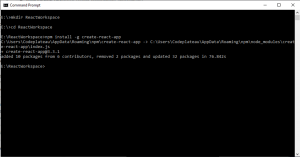
Step 4: Setting up React Boilerplate.

We will install the boilerplate globally.

npm install –g create-react-app

Create a React Boilerplate using the above command – see screenshot.

-g represents the global installation type.

Step 5: After successfully installing a global react environment. Create react demo app using the following command:

create-react-app demoapp

The above statement will create a new directory named demoapp inside your current directory with a bunch of files needed to successfully run a React app.

Let’s have the look at the directory created by the above command:

In the following directory, you will see a number of files. The main files we will be working on within the basic course are index.html and index.js. The index.html file will have a div element with id = “root”, inside which everything will be rendered and all of our React code will be inside the index.js file.
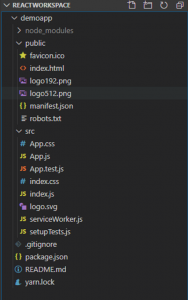
Now, that we have successfully set up the development environment for React Js.

The last thing is to start the development server.


Step 6: To start the development server, go inside your current directory “demoapp” and execute the below command:

npm start

After successfully running the above command your compiler will show the below message on your screen:
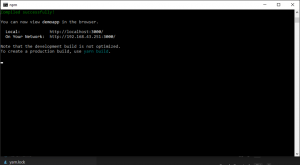
And after starting our first React application, we will see the default screen on the browser.

Component creation in React Js:


            Components are the reusable peace of code for building blocks of any React application. It’s like JavaScript functions. They accept arbitrary inputs (called “props”) and return React elements describing what should display on the screen.

We have seen the default structure of the ReactJS application in step 5 second screenshot.

Create a new component file in /src folder-
I have created Welcome.js and add component code in that file-
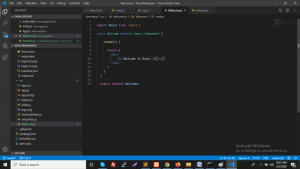

import React from 'react';
class Welcome extends React.Component {
render() {
return (

Welcome to React Js

)
}
}
export default Welcome;

see the following screenshot:

And we need to add our newly created Welcome.js file into index.js to see it on the browser screen:
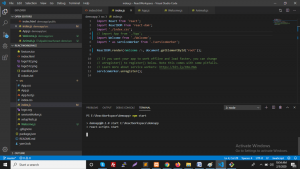
Now we can see the output on browser screen:
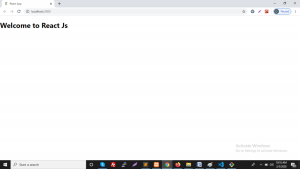
In the above article, we learned how to setup React JS Environment and create simple components.

Process of Understanding and Adapting to React Js

When I got to know that our company will be focusing on new technologies, I was excited and nervous at the same time. JavaScript is the language that is currently trending, so it was an obvious preference. We were using JavaScript but only in limited projects that are making the pages dynamic. There are many frameworks built-in JavaScript for both frontend and backend. Initially, it was finalized API will be built in Nodejs as it is widely used and very easy to understand and as it is widely used it is easy to develop and debug code. I found some useful tutorials for Express Js (Node Js framework) and it felt very easy to understand as we had experience in Laravel Framework (PHP framework). API for me was a straightforward task but the real fun began when we started with the frontend part. Initially, it was finalized to go with AngularJs (framework) as it is a widely used JavaScript framework but it was not straightforward to understand and many people had issues adapting the angular Js. And then we were introduced to React Js (we got tutorials from an expert as well).

So, after working on React Js for the last 4 months, I will put forward the blockers we had and also the interesting bits of React Js. many people confuse it as an Alternative framework to AngularJs but it is not. It is an open-source Library created and managed by Facebook. React Js can be integrated with any framework as it is the V of MVC that is, it just renders the code in the browser with the help of JSX. So, let’s start with the Advantage we felt of the React Js.

1) Easy to Use

Documentation is the key to any framework/library and the documentation for reacting is maintained very well and it’s easy to understand and move forward with. There are also many courses and tutorials available online which helps further.

2) Reusable Components

Components are used for managing the Html code which will be further rendered in the browser. A component has its own set of control and logic. Components can be nested with each other that further helps for reusability.

3) Virtual Dom

React Js uses a virtual DOM-based mechanism to fill data in HTML DOM. The virtual DOM works fast as it only changes individual DOM elements instead of reloading complete DOM every time

4) Benefit of JavaScript Library

React Js is used by most of the Developers thanks to its flexible nature, there are no specific parameters. Developers get a free license to manage the code as per their feasibility

Now every coin has two sides and React Js is no different. Adapting to React Js was not a tricky task but there were some blockers that we can consider as a disadvantage. The following are the Disadvantages listed below.

1) JSX is a barrier

React Js uses JSX which has a syntax similar to Html, but therein lies the problem. Any developer who has used Html finds it hard to adapt to the JSX due to its complexity.

2) V of MVC

React Js cannot be used as a stand-alone platform as it is wholly dependent on the other technology to manage the data. They are only the UI layers of the app and nothing else.

3) Hard to Adapt the Pace of its Development

React Js introduced hooks which help in reducing code Complexity and Reusability but for a newbie, it becomes hard to debug the code as all the previous code is not built around hooks. So in general developers have to always adapt to the changes being done in the library.

4) Documentation can be Maintained Better

As I mentioned above React Js is a very rapidly growing library but if we look at the documentation it does not provide adequate information on the new things introduced and the developers are left with trial and error for adapting to new things.

5) Not SEO Friendly

There are tools available to Render our Meta tags on the page but unfortunately, Facebook does not crawl through them and we are left with managing the Tags with some other Platform for the Particular Page.

Overall if we consider, React Js is the Present and the Future of JavaScript web development. It has its sets of Pros and Cons but to be honest it makes the process of Dynamic web development fun and easy thanks to its flexibility.

What are React Hooks?

React Hooks were introduced at React Conf October 2018, where two major functional
components were highlighted – useState and useEffect. Function compontents were initially known as functional stateless components (FSC), where they are finally able to
useState with React Hooks. Therefore, many people refer them as function
components.

Hooks let you “hook into” the underlying lifecycle and state changes of a component
within a functional component. More than that, they often also improve readability and
organization of your components. We can check 2 hooks that are used regularly while
using React Js.

1) useState:
import React from 'react';
function App() {
return (
<div>
<h1>0</h1>
<button>Change!</button>
</div>
);
}

In this above example, this is a simple functional component in which we can import our
first hooks useState for Handel state data.

import React, { useState } from 'react';
function App() {
const value = useState();
console.log(value);
return (
<div>
<h1>0</h1>
<button>Change!</button>
</div>
);}

If we run this code and console the data then we can get a response as below
> [null, ƒ()]
And if we add an argument into use state
const value = useState(true);
we can get a response as below
> [true, ƒ()]
Now we can access state value and render it in <h1> in our component such as


import React, { useState } from 'react';
function App() {
const value = useState(0);
console.log(value); // [0, ƒ()]
return (
<div>
<h1>{value[0]}</h1>
<button>Change!</button>
</div>
);
}

There are 2 types of functionality that store data into use state

1) Object destructuring
2) Array destructuring

Array destructing is almost the same, but uses square brackets [ ] instead of curly
braces { }.
Using array destructuring, we can get the initial value of state from the useState() hook.

import React, { useState } from 'react';
function App() {
// remember, there's a second item from the array that's missing here, but we'll come
right back to use it soon
const [count] = useState(0);
return (
<div>
<h1>{count}</h1>
<button>Change!</button>
</div>
);
}

Right now we can get initial state value but how we can change the value in hooks that
are described in the below example


function App() {
const [count, setCount] = useState(0);
function change() {
setCount(prevCount => prevCount + 1);
}
return (
<div>
<h1>{count}</h1>
<button onClick={change}>Change!</button>
</div>
);
}

Here we first set initial count to use state is 0 then for an update that
counts we can use onclick event listener on button click.
Remember that useState() hook returns an array with 2 members. The second
member is a function that updates the state!

2)useEffect

In class-based components, we needed to know the basics of lifecycle methods and which
method is perfect for different situations. useEffect hook simplified this situation. If you wish to
perform side effects, network request, manual DOM manipulation, event listeners or timeouts
and intervals.
useEffect hook can be imported just like useState.

import React, { useState, useEffect } from 'react';

To make useEffect work, we pass it an anonymous function as an argument. Whenever React
re-renders this component, it will run the function we pass to useEffect

useEffect will run every time the component re-renders, and the component will re-render every
time the state is changed.
So if we write the following code, it will get us stuck in an infinite loop! This is a very common
gotcha with useEffect

If you want to call useEffect on some call function that also possible in react hooks.

Pre-Launch Website Checklist For Designers

Website Designing is a long and complicated process as they need to stay connected to different people during the whole process of development of a website. Like this starts from meeting the client’s and understanding their views about the site and making it come alive. Certainly, to handle this logging process and delivering it perfectly it’s important that none of the steps is missed or skipped out. This is the scenario where one would know how important the checklist be. Not only in a professional way but also in the personal day to day life, it’s a saver. With the list, it’s most likely that we don’t miss any of the important tasks and miss out the perfection just by one minor mistake.

Below are listed down the 7 checklist points which designers shouldn’t miss before the launch of any website.

1. Industry Standards

There might be different views of the client and what actually is the industry standards currently. A website designer is responsible to mold the ideas of the clients to fits them into the industry level. Having the best designing ideas would work if there is no relevancy with the industry and its standards.

2. Layout

The layout of the website should match the screen sizes of the devices which the end-user is using. Basically, the design should be compatible with all the devices which are also known as the responsive design of the website. The business may lose a lot of users due to not having a responsive website.

3. Browsers

Making the website compatible is one thing but browser compatibility is another factor which cannot be ignored. There are devices which have the default browser for any of the search query. Overlooking the browser compatibility indirectly deflects the user from coming to your website.

4. Favicon

Favicon is the small icon similar to the logo placed at the web browser which is nothing but the graphical representation of the website. Having a favicon on the website is to improve the user experience while browsing the website. This comes under the minor thing to do which has a large impact on the users.

5. Color

It is important to maintain a color scheme on the overall website by designers. Not doing this may lead the users to break the flow of the process and also deflecting them from the goal. Also, the colors should match the industry-standard whether it’s a service provider or a product delivering business.

6. Error Pages

Due to some technical errors, there might be conditions which show up the error pages like 404. There should be properly designed pages for such situations. The error pages don’t divert the user and tend to leave the whole website instead of just a web page.

7. Important Elements

There are always certain elements which are important for your website which consists of about company, discounts, offers, highlighted products, etc. These are some information which needs to be seen by the user and understand the motive of the site in the first sight. Try keeping these types of information on the first fold of the website, means without a single scroll.

These tips will certainly help to deliver the professional website to the client by website designers.
To get the best websites in the industry, CodePlateau Technology will help to do it. Reviewed as the best web designing company in Pune, by their clients.

10 Tips To Improve Your Websites User Experience

A website is a face to any business in this digitalized world. For any customer, website is the first and easiest way to collect more information about the business. On the other side for any business, a chance to impress the users in a single glance. This first impression on any user is very important, as upon it the decision of converting a user into a customer is dependent. Nowadays, mobile has become the most and commonly used device by any user. Due to this even businessman are investing more in improving the user experience. So, they can extend their customers list from the new users browsing their website through any device.

Below are the tips to enhance the user experience for the website

1. Above the Fold – Keep all the important content above the fold of the page. Not keeping the important content would misguide the user and have greater chances to leave the website. Let people understand what you want to showcase within the first view of the website.

2. White Space

– It is the blank space given at the sides of the website. This has a lot of importance in terms of designing perspective. This white space gives the viewer an open space to think and also gives a good effect on the elements. Too much content and elements can confuse the user and indirectly forced to leave the site.

3. Loading Speed

– People get a variety of options to their single search that’s why the waiting tending for any site to load is very less. According to the statistics, having a loading time anywhere between 2.4 to 3 seconds on mobile and desktop is ideal. Beyond that time, you start to lose your conversation rate.

4. Maintaining a Flow

– For instance, if your ultimate goal is to get contact details from the users visiting a website, then maintain proper flow. This flow should be simple enough and understandable easily by any non-technical person too. Don’t distract the user in between the flow buy showing them different other offers or products.

5. Responsive

– Users are not limited to any particular nowadays. For greater number of conversions make your website fit to all the screen sizes and resolutions. Making it compatible lets the users navigate, browse and get the required information from any device.

6. Call to Action

– In some of the cases, users struggle a lot to connect the business services. This led to the loss of conversation due to a simple designing flaw of not highlighting the call to action button. Make this button bold and clear enough to get the attention of the users.

7. Use Images

– Let your images speak out the motive than by words. Users avoid long and plain text and prefer the images. This also helps the longer engagement of the user when images are used in the site.

8. Social Sharing

– Content or images are more frequently share by the users on their social media platforms. Don’t miss this opportunity of free marketing for your brand. Just add the social media sharing buttons on the site and keep a track to count the sharing.

9. Contact Details

– Let your contact details be easily visible to the users while they are totally satisfied with all the information and want to get connected with you. Update the details on a regular basis so you don’t miss out your customers anymore.

10. Design for Users

– Last but certainly not the least important point is to design with a perspective of the user. When you design according to your choice you might lose a larger quantity of the users from converting them to the customers.

These are the important and most useful tips a designer shouldn’t miss out while creating a website. And for all the professional designing and development services, CodePlateau Technology is one of the recognized companies in Pune.

Elements for Effective B2B Web Design

Business to Business websites is altogether a different case when comes to designing part. In the past few years, the sight and the appearance of even B2B websites have changed drastically. Previously the sites were simple enough showcasing the content part without much expertise in web designing section. But now it may be B2C or B2B, everyone has raised their bars to serve better to their customers respectively. And in this overall process of serving the best to the customers, web designing is playing a vital role.

Let’s discuss some of the important elements in web designing for B2B Websites.

1. Content

– Content is a very large cluster to be considered while designing. For any site its important to be enough self-defined which could be understood by the expert as well as non-technical. Consider every user as the new user who has never landed on the website ever. Accordingly, design your company or brand story to let the user know about you and your workings. In B2B website its also important to have a well-defined section for products and services. Not understanding your products and services will certainly hit the revenue even with the best designing and content part. Make your services stand out from the other section, as any user has the initial motto get the product or services.

2. Speed

– In the present time, all the business has the most impatient user which they could ever have got. The website which doesn’t load fast won’t earn any revenue, even thought with best in class designing. After Google’s update of mobile responsive, all the website is compatible with the mobile and also load much faster. As most of the users are now using mobile as the prime device for any of their queries, it is now necessary to make the website adaptable to it.

3. Navigation

– Navigation through the website is one of the things which is been overlooked. As through the overall process of developing and designing a website, the professionals become habitual to the menu options and its placements. Due to this, the user’s perfective is snubbed, which user poor user experience. Improper navigation also leads the user from not reaching the goal and cause loss of conversion. Make a proper plan and steps about accomplishing the goal by the customer.

4. Contact Page

– Adding proper contact page has multiple benefits. If the user is interested in the product or service, he can directly contact you about it. Even if due to some technical issue the order page is not working, contact details will help out the user. Also having proper details like address, contact number and other media help up the user to build the trust about the brand.

5. Portfolio

– Being a business product or service delivering company its important to showcase the success stories of the company. With the help of portfolio, one can display the quality of the work to new users. Also, this helps in enhancing the brand name in the industry. Users nowadays prefer getting reviews first and then opt for the service or buy the products. So, let your customers speak about the work who have already experience the quality and have trust to recommend it to others.

There are certainly a lot more of the elements which are included in the checklist to enhance your B2B websites. Do share them with us in the below comment section.

Impact of Incomplete Content On Web Designing

Web Designing – Having a website has become a mandatory thing by any business or service provider, it may be a small or large one. Nowadays, only explaining your views about the business and desired the website to the designer of a professional company is not enough. Getting involved during the whole process and providing the proper content and media is also essential. If the company is taking care of all the parts then approving the desired media are equally important. It’s being a common and frequent mistake by any company and client together is incomplete content. This content includes audience objective and actions on the website, images, videos, content, etc. which are equally important.

In this blog, we will be discussing the impact of incomplete information on web designing.

1. Dummy Content

– It is a common scenario of using fake content during the early stages of development. This needs to be changed before delivery the website to the client or publishing it. It’s a known fact that content is king for the SEO ranking purpose. Any content left unchanged can hamper the website and the investment even though with high user experience and crawling speed.

2. Competitors

– In multiple questionnaires by the developer team, a common question asked is about the competitors in the same industry. Not providing the proper information to the designers and developers leaves only one the option to refer the competitors. This leads to a loss of creativity and the uniqueness of the website. Providing proper content and images helps a lot in creating distinctiveness while web designing.

3. USP

– It may happen multiple times that client may own a unique selling point which might be missed out during the initial conversations. Not mentioning this point may lose a lot of audiences old as well as the new one. Make this point a mandatory or a priority while developing or web designing.

4. Images

– There are two cases when it comes to the images section. Either they are dummy or copyright images used during the developing stage. And the second case is provided images by the client which are of low quality. In both cases, the negative impact is faced by the website. Copyright images hinder the trust of the audience. And low-quality image affects the look and feel of the website which is compromised.

5. Elements

Elements are also known as the features which need to be incorporated in the website. The list is huge like shopping cart, contact form, newsletter subscription, press release section, newsfeeds, gallery and many more. This needs to be pre-defined and confirmed to avoid the adjustments and rearrangements of the sections. A proper place and functionality are created during the development stage.

6. Choices

– It is important to know the websites which are liked by the client. It sometimes happens that what designer and developer like is not liked by the client due to different choices. Getting an overview of the likes and dislikes helps to get the perspective of the design desired by the client.

These are the few things need to be taken care of by both the developer and the client to give the website a standard feel which is even SEO friendly. Choosing the professional always take care of the checklist in their ways to give the best outcome.

5 Mistakes to Avoid While Designing a Website

Website Designing is the most crucial part of the overall process of website development. During this process, the main perspective is to take care of the users and its overall effortless experience throughout the website. The main goal for any website designer is to lock up the user into the website and convert them to the customer. Also, from the designers’ point of view, it is also mandatory to fulfill the client’s expectations and also maintain the standards of the industry. This can be too much complicated in certain cases and end up losing users and revenue simultaneously.

Let’s take a look at the mistakes which need to be avoided during website designing.

1. Website Speed

– The website speed has become the most important factor for any site to sustain in the competition as well in to maintain its higher position in the search engines. Due to the availability of high speed of internet, people have lost their level of patience. Users can’t wait for more than 3 seconds to load the site. So, to generate the traffic and convert them into conversions it’s really important to maintain the quick loading speed of the website.

2. Navigation Bar

– Sometimes to make things stand out or to try out innovative ideas, designing may go wrong have negative effects instead of positive. That doesn’t mean trying new things should not be an option. Try to maintain the standards of every element. Like for navigation bars are placed ideally on the top or at the most right side. Placing them totally in a new place or making it invisible or hidden bars misguide the users. Elements which let the user struggle has comparatively fewer conversions.

3. Spacing

– If ever want to know the importance of the white or blank space ask any website designer. Blank or white space gives the room to the user to think and properly understand the site information. Also, this does not distract the user and concentrate only on one thing. Its always advisable to give the white spacing on the website on both sides.

4. Grammatical Mistakes

– Spelling mistakes can be counted into a minor one but the effect is major on the site. Website losses its credibility and the trust of the users due to grammatical spelling mistakes. Content is counted into the first impression and when it is bad, the user never returns to the website ever. This can cost you a huge amount when the users don’t return to your website.

5. Mobile-Friendly

– According to the statistics, 51.65% of the users were operating mobile devices for searching the queries. So if you want to get a number of traffic and the conversions you must have a mobile-friendly website.

We hope these tips would be useful while designing the website which could increase the revenue and the popularity of the site.

Web Designing Tips For Small Business

Website Designing for a small business or the startup company plays a very important role for growth. The business is totally dependent upon the designs and layouts of the site to attract the customers. As being a new business, people are not aware of the brand and its services, so it’s a difficult task altogether to start and gain profit at the initial levels. There are certainly many other factors which are required for the conversions on a new website. These factors include development, content, navigation and many more. But when the user land on the website, attractive designing is the only factor which holds the user. To overcome multiple hurdles, it becomes mandatory for any businessman to choose the professional service provider to design and develop the website.

Below are 7 tips listed that help your small business website to gain presence.

1. Strategic Planning

– For any business, it may be small or big, it’s very important to plan out the things at the initial level. Planning the strategy helps in multiple ways like you get the clear path to start working on, track the progress, set the deadlines and many more things. It helps every individual to work in the decided flow and avoid putting extra and random efforts on unnecessary work. Its also been said many people, planning helps in strength to the business for its steady growth and continuous prosperity.

2. Professional Design

– As discussed above, designing is the most important and crucial part of any small business. Hire the professional website designing company for your website development. They know the proper color scheme which would match the business platform and also the industry standards. The relevancy between the image and the fonts should be maintained to give the professional look to the website.

3. Services & Products

– Highlight the products or the services which are provided by the company. The user should not struggle to find the services or products on the website. Showcase them well enough to catch the attraction of the user while just scrolling through. Try to design an individual page for the services or products. This would also help in ranking the website in the search engines.

4. Responsive

– Nowadays there are multiple screen size and browser’s availabilities which differ from user to user device usage. To acquire a large portion of the user for any small business it’s important to create a responsive website. These websites are compatible with any device and the browser irrespective of any user. There is no such rule to gain business from a specific device, so be prepared to be compatible with the user.

5. Hierarchy

– There has to be the proper hierarchy maintained along with the full website. Like the common structure has the home page, followed by the company profile and the services and products. The last steps include the connection options like contact details etc. Social media shouldn’t be avoided, this has a very good impact on the user and also gains trust.

6. Clear CTA

– Call to Action button should catch an eye of every visitor scrolling the website. It is being a case where a user is convinced and want to buy the service but unable to find the option where to get it from. Provide multiple times the call to action button on the whole website, so no user is missed to convert it into the small business customer list.

A successful small business takes a lot of efforts to grow during its initial stage. Also, the skills and the professional perspective is simultaneously important. It’s also advisable to hire a professional website designing company for the early level of developments.